GDG Coding Jams
Build with AI. Together.
Share
← Back to the jams
Track 06

My Corner

Name + bio + 3 things → a live URL you can text your mom.

✅ Drop-in friendly2-hour jamShips in 45 min
🏠
The demo

What it looks like when it’s working

In the room · 45 minutes

What you’ll build

Single page. Name, 2-line bio, 3 things you're proud of, one photo. Deploy to a real URL via Vercel/Netlify drag-and-drop. That's it.

The moment it clicks

I have a website I can text my mom.

Things to think about

While you build

  • The hardest input is you. Say it out loud to the room to get unstuck — it's much easier to describe yourself when someone else is asking.
  • Pick the photo before the bio. The photo sets the tone for everything else on the page.
  • A live URL today beats a perfect site next week. Drag-and-drop deploy first; iterate on copy after.
  • Resist adding a blog, a contact form, a guestbook. All polished version — every one is its own afternoon.
The 2-hour Jam rhythm

How the night flows

Every Coding Jam follows the same five-phase shape. Talking is short, building is long.

  1. 0:00 – 0:15
    Intro

    Grab a name tag and a slice, say hello to the instructor, and meet the people either side of you — you'll be asking them things later, so it pays to know their names now. Low pressure, high creativity, ship something messy. Then a quick word on what the room is building tonight, and you're off.

  2. 0:15 – 0:30
    Credits & setup

    The instructor shares the Google Cloud credits with the room. Everyone gets their environment ready — whichever tool they brought. Nobody should be installing anything once the build starts.

  3. 0:30 – 1:35
    Build

    Heads down, and enjoy it — this is the part everyone came for. The agent does the typing; you decide what it's making. Ask the room when you get stuck; someone two seats away hit the same wall ten minutes ago. Want more structure? The codelab walks the spec-driven route — Setup → Plan → Review → Build → API → Verify — but nobody has to follow it.

  4. 1:35 – 2:00
    Share & submit

    Show the room what you made — two minutes, screen-shared from your seat. Half-finished is welcome; the wobbly ones are usually the most interesting. Say what surprised you along the way, and cheer for everyone else while you're at it. Then submit your build before you leave. This is the one thing not to skip — it's what puts your name and your chapter on the showcase, and it takes about two minutes.

Polished version pulls in

Where to take it after the jam

The 45-minute build is the win in the room. These are the ideas you can pull in over the next week — your homework isn’t homework, it’s the polished version.

  • Custom domain
  • Blog/log section
  • Contact form
  • Guestbook
  • Seasonal/animated theme
  • Links-tree mode
  • AI-generated 'sounds like you' refinements
If you get stuck

Open one of these in the starter — safety nets, not requirements.

  • context/deploy-to-vercel.md
  • context/self-writing-prompts.md
From the community

Builds shipped from this track

All builds from this track →
Previs
Track 06GDG Brooklyn
Previs

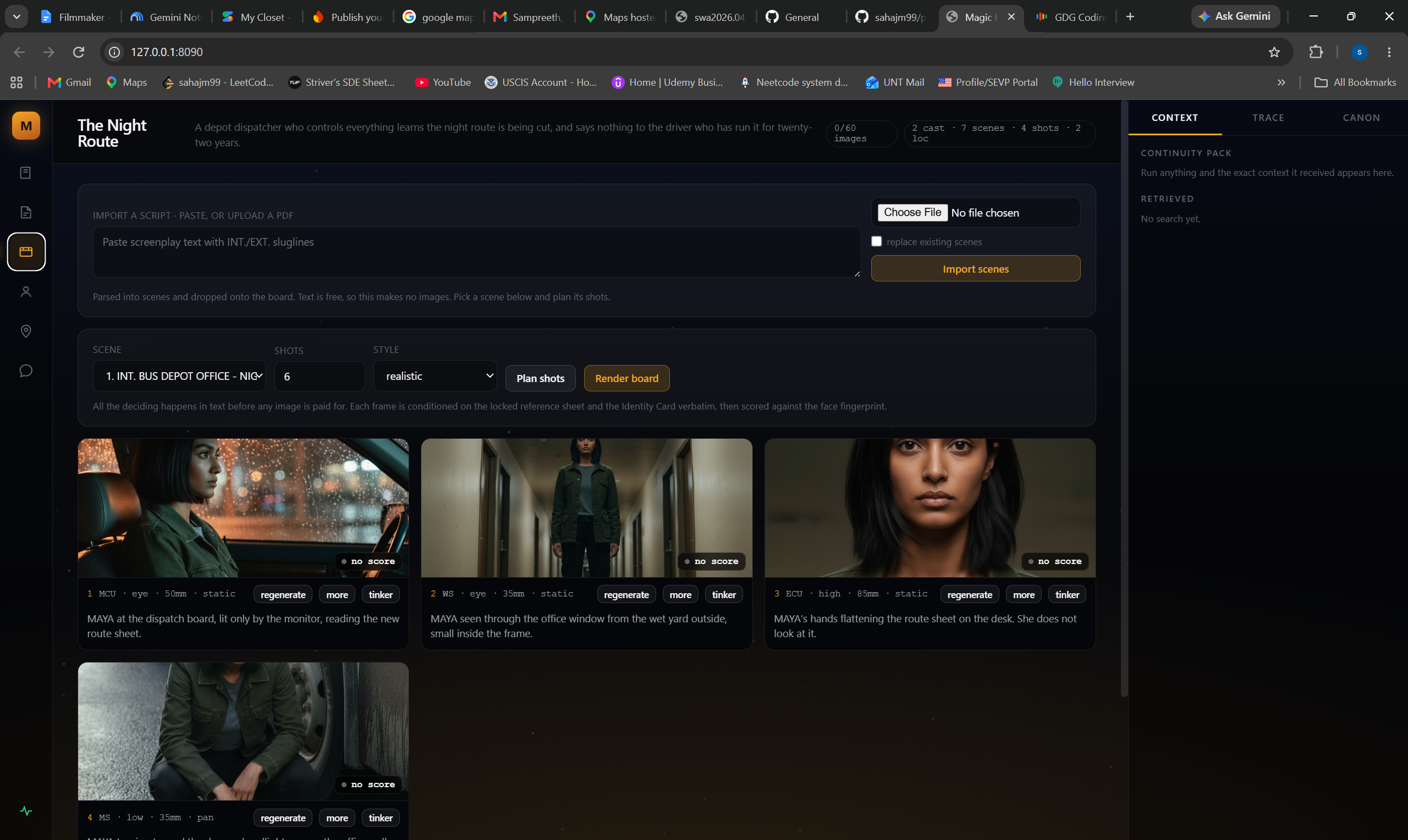
Magic Hour turns a screenplay into a consistent storyboard: your characters keep the same face and voice from scene 1 to scene 18, because every generated frame is scored against a locked identity card. A pre‑viz studio for filmmakers, with AI shot lists, in‑character dialogue, and real location scouting.

I assumed character drift was the image model being inconsistent but the model was fine all along; the drift came entirely from us re‑describing the character on every call instead of compiling her look once and reusing it verbatim.

Pick another track

All independent — start anywhere.

See all jams →